
Best Scanners for Selling Trading Cards (2026): 5 Picks for Raw Cards, Slabs & Bulk

Taking a decent photo of one trading card is easy. Doing it 300 times because you are trying to get a stack of Pokemon, Magic, One Piece or sports cards listed on eBay is where the process starts eating your afternoon.
A scanner can remove a lot of that friction, but the right one depends heavily on what you are selling. If the goal is moving large quantities of inexpensive raw cards, speed matters. If you are imaging slabs or a card expensive enough that you are nervous touching it, I would happily give up some speed for a flatbed.
After looking through the scanners being used specifically for trading-card workflows, these are the five I would consider.
Best Trading Card Scanners at a Glance
Amazon Affiliate Disclosure: Thornberry Collectibles participates in the Amazon Associates Program. As an Amazon Associate, we earn from qualifying purchases.
Scanner | Best For | Check Price on Amazon |
Best overall for high-volume sellers | ||
Best value for raw-card inventory | ||
Best wireless workflow | ||
Best for slabs and valuable cards | ||
Best budget flatbed |
The biggest decision is not really Ricoh versus Epson. It is auto-feed versus flatbed.
Auto-feed scanners make sense when speed is the entire point. A flatbed makes more sense when you want more control over the card being scanned or you are working with slabs and higher-value inventory.
1. Ricoh fi-8170: Best Overall Trading Card Scanner

If you are running enough cards through your eBay operation that scanning has become part of the production line, the Ricoh fi-8170 is the best scanner for trading cards I would start with.
Ricoh actually lists trading card scanning as one of the fi-8170's supported applications, rather than leaving collectors to figure out whether a document scanner happens to work with cards. It can scan both sides in one pass and is rated for up to 70 pages or 140 images per minute.
More importantly, Card Dealer Pro lists the fi-8170 as its most recommended auto-feed scanner for its Trading Card Scanner application.
That is a much stronger recommendation to me than a generic office-scanner review because Card Dealer Pro is testing it for the exact job we care about.
The downside is obvious: this is expensive equipment. If you list 20 cards a week, buying a professional document scanner to save a few minutes probably makes no sense. If you are trying to process hundreds or thousands of raw singles, that calculation changes quickly.
2. Epson WorkForce ES-400 II: Best Value for Raw Cards

The Epson ES-400 II is the option I would look at if the Ricoh sounds great right up until you see what it costs.
It scans both sides in a single pass at up to 35 pages or 70 images per minute and has a 50-sheet automatic document feeder. Epson also includes a TWAIN driver, which matters if you eventually start integrating the scanner with inventory or image-management software.
For a collector turning stacks of inexpensive singles into eBay listings, that is probably enough scanner.
I would think of the ES-400 II as the working seller's option. You are giving up some of the speed and card-specific pedigree of the fi-8170, but you are also spending considerably less money.
This is the one I would be most tempted by if I were trying to increase listing volume without immediately buying dealer-level equipment.
3. Epson WorkForce ES-580W: Best Wireless Trading Card Scanner

The Epson ES-580W is less about getting dramatically better card images than the ES-400 II and more about making the workflow easier.
It keeps the same rated 35 ppm/70 ipm scanning speed while adding Wi-Fi, a 4.3-inch touchscreen and a much larger 100-sheet automatic document feeder. It can also scan directly to a USB drive or connected devices without forcing everything through one computer.
That convenience starts to matter if your card-processing station is separate from your main computer or if multiple people are working around the same inventory.
If you are only scanning cards at one desk and transferring everything directly to the same PC, I would save the money and buy the ES-400 II. If the wireless workflow solves an actual problem in your setup, the ES-580W becomes much easier to justify.
4. Epson Perfection V600: Best Scanner for Slabs and Valuable Cards
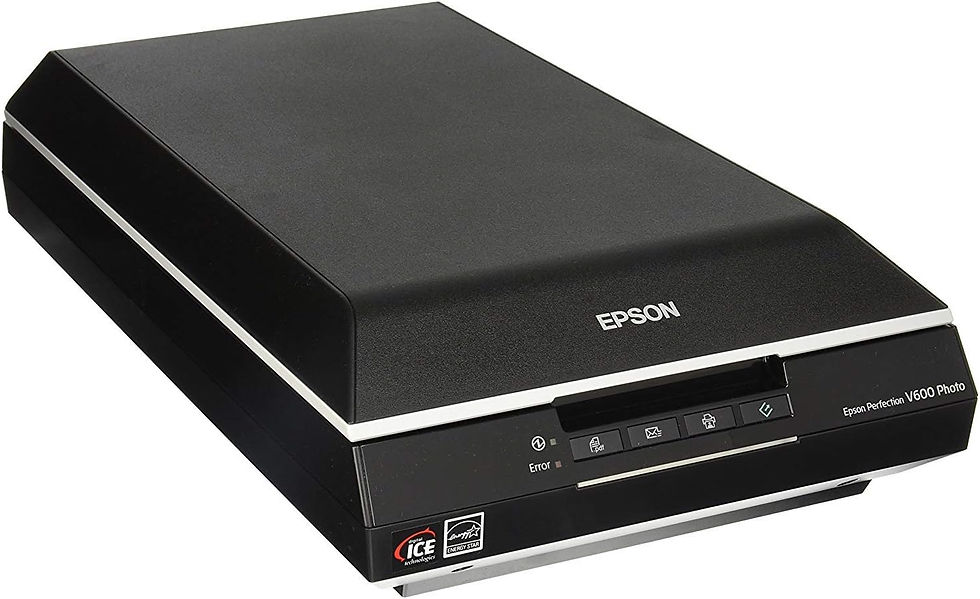
The Epson V600 is the oddball in this list, and that is exactly why it belongs here.
Instead of feeding cards through rollers, the V600 is a traditional flatbed scanner. Card Dealer Pro lists it as its most recommended flatbed scanner for trading cards, alongside the fi-8170 on the auto-feed side.
The V600 uses a CCD sensor and offers up to 6400 dpi optical resolution.
You do not need anything close to 6400 dpi for an eBay listing, but the larger point is that this is an image-focused flatbed rather than a machine designed primarily to chew through stacks of office documents.
I would choose the V600 when image quality and control matter more than speed, particularly for slabs or more valuable singles. The tradeoff is that every card has to be placed and scanned manually, so this is not what I would want sitting beside a 1,000-card bulk pile.
5. Canon CanoScan LiDE 300: Best Budget Flatbed

If you want to experiment with scanning cards without dropping several hundred dollars, the Canon CanoScan LiDE 300 is the easiest entry point on this list.
It is a basic flatbed scanner with 2400 x 2400 dpi optical resolution. Canon rates a standard 300-dpi color document scan at about 10 seconds.
That is nowhere near the throughput of the Ricoh or Epson auto-feed models, but that is not what you are buying it for. You are getting a cheap flatbed that lets you place a card on the glass, scan it and move on without making a major equipment investment.
I would not expect it to replace the V600 for someone building a serious slab-imaging workflow. The LiDE 300 uses a CIS sensor rather than the V600's CCD design, and the V600 is the model Card Dealer Pro specifically recommends for trading cards.
For a small seller who just wants clean scans and does not care about processing cards at dealer speed, though, the price makes a lot of sense.
Should You Use an Auto-Feed Scanner for Trading Cards?
This is where I would separate inventory by value.
If I have a pile of inexpensive raw cards that need listings, I want speed. That is exactly where something like the fi-8170 or ES-400 II earns its keep.
If I am dealing with a slab or a raw card expensive enough that I would be irritated with myself for rushing the process, I am moving to a flatbed. Saving 20 seconds on one valuable card is not going to change my business.
That does not make one scanner better than the other. They solve different bottlenecks.
Which Trading Card Scanner Would I Buy?
For a serious high-volume operation, the Ricoh fi-8170 is the best scanner here. Ricoh supports trading-card scanning directly, and Card Dealer Pro recommends the machine for exactly that workflow.
For most people building an eBay card business from home, though, I think the Epson ES-400 II is the more sensible starting point. It gives you an automatic feeder, duplex scanning and plenty of speed without immediately jumping into professional-dealer pricing.
I would then keep a flatbed around for the cards that deserve more attention. The Epson V600 is the obvious choice if slabs and expensive singles are a meaningful part of what you sell.
The scanner itself is not going to make an eBay business work, but removing five minutes of friction from something you do hundreds of times eventually starts to matter.
That is really what I am looking for here.

Comments